
HELP & SUPPORT
The fastest way to get help with any questions you might have regarding the store, packages, previous purchases, or general in-game support is through our Discord server where you can open a support ticket and contact our support team instantly!

All packages are delivered automatically to our game servers upon purchase and will be added to your LSPD:FR Online account — package delivery takes a few seconds in most cases, though can sometimes be a few minutes. If you are in-game, you will receive a pop-up notification that confirms delivery, otherwise, you will receive a similar notification the next time you connect to our game servers and select a character.
When a package is added to your account, it becomes available to view, redeem, or gift to someone else in the Store page which you can access by bringing up the Pause Menu with the Escape key, or alternatively use the /store command.
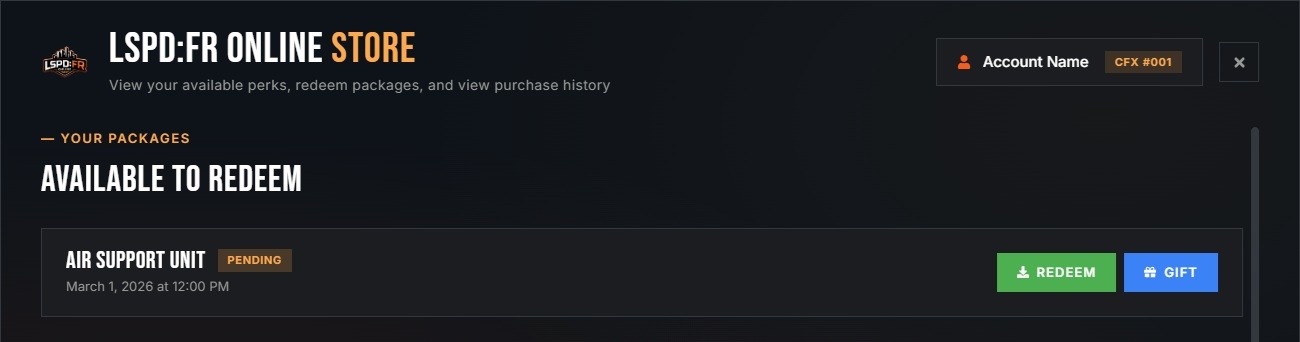
Your available packages are shown in this list and can be redeemed to activate them. If the package is character-specific, you will be prompted to confirm the character of your choice that you wish to redeem the package on.
For subscription packages, the package is redeemed and activated automatically upon delivery — subscription packages cannot be gifted to others.
Please allow a few minutes for purchases to process from the store and into the LSPD:FRO game servers. If after several minutes you still have not received the in-game notification confirming your purchase and it is not visible in the Store tab within the Pause Menu, check the following:
Packages can be gifted to another LSPD:FRO account from the in-game Store menu once they are added to your account! You can gift the package to someone else by their LSPD:FR Online account username which will instantly become available for them to redeem.
Please be aware that only one-time purchase packages can be gifted — subscription packages cannot be gifted or transferred to other users.
If you are having trouble with getting your payment processed, then please wait a couple of minutes and try again. Should you continue to have issues then please get in touch with Tebex Customer Support as they handle payments on our behalf.
If you still need help or further guidance, feel free to get in touch with us and open a support ticket in our Discord server.
We have a variety of payment methods available through our checkout. The available options are presented when you proceed to checkout and are localized based on the country you are in.
You can view your payment history and manage your active subscriptions on the Tebex portal: checkout.tebex.io/payment-history
Look no further, we're here to help! The fastest way to get support is through our Discord server, you can join and create a support ticket that will be assigned to a member of our team that would be more than happy to help you with your query. Alternatively, you can also get in touch via email to support@lspdfronline.com where you can describe your query and we will revert back to you as soon as possible.

 LOGIN WITH FIVEM